What if your PDFs could talk back?

You’ve got a 100-page report sitting on your desktop. Your boss asks, “What did the Q3 section say about churn?” You open it. You scroll. You ctrl+F. You give up and skim.
What if you could just ask the document? And it answered — with the exact paragraph and page number?
That’s what we’re building. A complete RAG pipeline using LangChain, OpenAI, and FAISS. Drop any PDF or text file in a folder, ask questions in plain English, get answers grounded in your data.
1. Wait — Why Can’t I Just Paste It Into ChatGPT?

Good question. You can. But think about what happens:
- 100-page doc? Doesn’t fit. Context window says no.
- 10-page doc that fits? Cool, but you’re paying for every token — every time you ask a question. The whole document. Again and again.
- The real killer? The LLM reads everything — the title page, the appendix, the table of contents — and gets distracted. Your answer quality tanks.
RAG flips this. Instead of shoving the whole book at the LLM, you hand it just the 3 paragraphs that matter.
Without RAG:
  "What is the Turing Test?" → Send ALL 100 pages → Slow, expensive, noisy

With RAG:
  "What is the Turing Test?" → Search → Find 3 relevant chunks → Send only those → Fast, cheap, precise
That’s the whole idea. Now let’s build it.
2. Load Your Documents

First problem: how do you get text out of a PDF? Or a .txt file? Or a CSV? Each format needs different parsing logic.
LangChain says: don’t worry about it. It has 100+ document loaders built in. We use DirectoryLoader — point it at a folder, it reads everything:
from langchain_community.document_loaders import DirectoryLoader, TextLoader, PyPDFLoader

def load_documents(docs_path="./docs"):
    txt_loader = DirectoryLoader(docs_path, glob="**/*.txt", loader_cls=TextLoader)
    pdf_loader = DirectoryLoader(docs_path, glob="**/*.pdf", loader_cls=PyPDFLoader)
    documents = txt_loader.load() + pdf_loader.load()
    return documents
Drop your files in /docs. That’s literally it. No file-reading boilerplate. LangChain handles the ugly parts — encoding issues, PDF layout parsing, page extraction — all of it.
3. Chunk It Up

Here’s a problem you might not see coming. You can’t embed a whole document as one vector — it’s too big and the meaning gets diluted. You need to break it into chunks. Small enough to be precise, big enough to carry a complete thought.
from langchain.text_splitter import RecursiveCharacterTextSplitter

splitter = RecursiveCharacterTextSplitter(
    chunk_size=500,
    chunk_overlap=50,
)
chunks = splitter.split_documents(documents)
Why “recursive”? It doesn’t just chop every 500 characters blindly. It tries to split on \n\n first (paragraph breaks), then \n (line breaks), then spaces. Your chunks respect natural boundaries.
Why overlap? Without it, you lose meaning at the edges:
Without overlap:
  Chunk 1: "...the conference was held in"
  Chunk 2: "1956 at Dartmouth College."
  → The year got ripped away from its sentence!

With 50-char overlap:
  Chunk 1: "...the conference was held in 1956 at Dartmouth"
  Chunk 2: "held in 1956 at Dartmouth College. The term..."
  → Both chunks carry the full thought ✓
Our sample document split into 14 chunks. A 100-page PDF might produce 500+. Doesn’t matter — the next step handles scale.
4. Turn Text Into Numbers

This is the part that makes RAG actually work. Every chunk gets converted into an embedding — a list of numbers that captures what the text means:
from langchain_openai import OpenAIEmbeddings
from langchain_community.vectorstores import FAISS

embeddings = OpenAIEmbeddings()
vector_store = FAISS.from_documents(chunks, embeddings)
Two lines. That’s it. Behind the scenes:
- OpenAIEmbeddings calls
text-embedding-ada-002— turns each chunk into a 1536-dimensional vector - FAISS (Facebook AI Similarity Search) indexes those vectors for lightning-fast lookup
But why numbers? Because you can’t search by meaning with plain text:
Your doc says:   "The patient showed elevated glucose levels"
You ask:         "Did anyone have high blood sugar?"

Keyword search:  ❌ zero matching words
Vector search:   ✅ embeddings are nearly identical — match found
“Elevated glucose” and “high blood sugar” mean the same thing. Their embeddings know that. Ctrl+F never will.
5. Wire It All Together — The Chain

You’ve got documents loaded, chunked, and embedded. Now you need something that takes a question, finds the right chunks, and asks the LLM to answer using only those chunks. Plus — it should remember what you asked before.
That’s a lot of plumbing. LangChain does it in one call:
from langchain_openai import ChatOpenAI
from langchain.chains import ConversationalRetrievalChain
from langchain.memory import ConversationBufferMemory

llm = ChatOpenAI(model="gpt-4o-mini", temperature=0)

memory = ConversationBufferMemory(
    memory_key="chat_history",
    return_messages=True,
    output_key="answer",
)

chain = ConversationalRetrievalChain.from_llm(
    llm=llm,
    retriever=vector_store.as_retriever(search_kwargs={"k": 3}),
    memory=memory,
    return_source_documents=True,
)
Three pieces snapping together like LEGO:
| Piece | Job |
|---|---|
| Retriever | Embeds your question, searches FAISS, returns top 3 chunks |
| Memory | Stores past Q&A so follow-up questions work |
| LLM | Reads chunks + history, generates a grounded answer |
What actually happens when you call chain.invoke()?
You: "What happened in the 1980s?"
         │
         ▼
┌─ Memory ─────────────────────────┐
│ Any prior conversation? Load it. │
└──────────────┬───────────────────┘
               ▼
┌─ Retriever ──────────────────────┐
│ "1980s" → embedding → FAISS     │
│ → top 3 matching chunks found   │
└──────────────┬───────────────────┘
               ▼
┌─ LLM ───────────────────────────┐
│ "Given this context:            │
│  [chunk about expert systems]   │
│  [chunk about Fifth Gen project]│
│  [chunk about AI industry boom] │
│                                 │
│  Question: What happened in     │
│  the 1980s?"                    │
│                                 │
│ → Answer using ONLY the context │
└──────────────┬──────────────────┘
               ▼
        Answer + Sources
The LLM isn’t guessing. It’s reading your document and answering from it. That’s the “grounded” in “grounded answers.”
6. Memory — The Thing That Makes Follow-Ups Work

Without memory, every question exists in a vacuum. Try this conversation without it:
You: "What happened in the 1980s?"
AI:  "Expert systems rose to prominence..."

You: "Tell me more about that"
AI:  "About what? I have no idea what 'that' means."
With ConversationBufferMemory, the chain stores every exchange. So when you say “that”, the LLM sees the full history and knows you mean the 1980s expert systems. It reformulates your vague follow-up into a precise retrieval query behind the scenes.
"Tell me more about that"
         │
Memory: previous topic was 1980s expert systems
         │
Actual search: "expert systems 1980s details"
         │
AI: "MYCIN was developed at Stanford for diagnosing bacterial infections..."
Conversations feel natural. That’s the point.
7. Does It Actually Work?

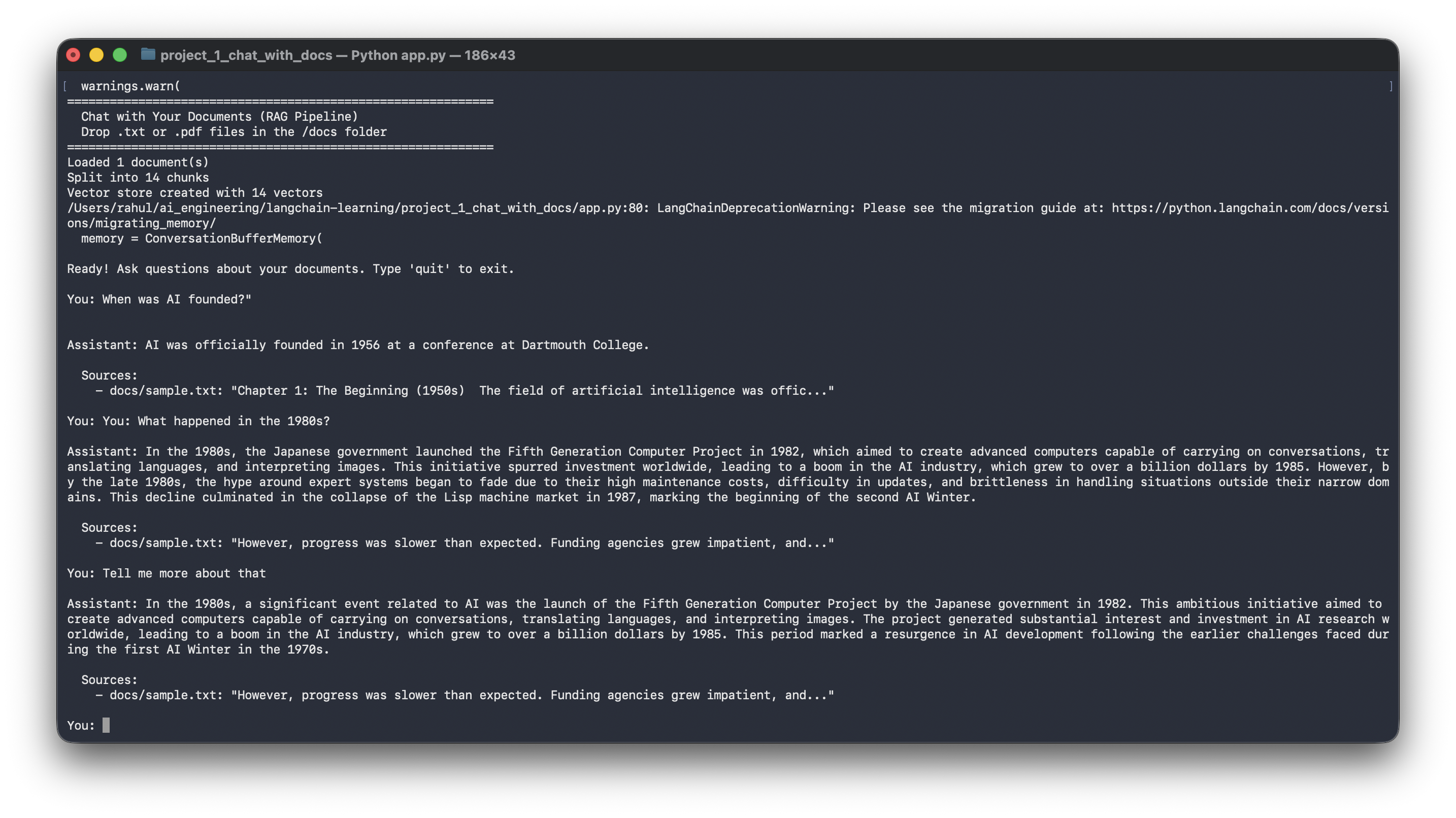
We loaded a sample document about the History of AI and asked three questions:
============================================================
  Chat with Your Documents (RAG Pipeline)
============================================================
Loaded 1 document(s)
Split into 14 chunks
Vector store created with 14 vectors

You: When was AI founded?
Assistant: AI was officially founded in 1956 at a conference at Dartmouth College.
  Sources:
    - docs/sample.txt

You: What happened in the 1980s?
Assistant: The Japanese government launched the Fifth Generation Computer
Project in 1982, aiming to create computers capable of carrying on
conversations, translating languages, and interpreting images...
  Sources:
    - docs/sample.txt

You: Tell me more about that
Assistant: The Fifth Generation Computer Project aimed to create advanced
computers capable of carrying on conversations, translating languages,
and interpreting images. This initiative spurred investment worldwide,
leading to a boom — the AI industry grew to over a billion dollars by 1985...
  Sources:
    - docs/sample.txt
Sources cited. Memory working. Answers pulled from the actual document, not the LLM’s training data.
The Full Pipeline

User drops PDFs/text files in /docs
        ↓
DirectoryLoader reads all files
        ↓
RecursiveCharacterTextSplitter chunks into ~500 char pieces
        ↓
OpenAI Embeddings converts each chunk → 1536-dim vector
        ↓
FAISS indexes all vectors in memory
        ↓
User asks a question
        ↓
Question → embedded → FAISS finds top 3 similar chunks
        ↓
Chunks + chat history + question → GPT-4o-mini
        ↓
Grounded answer with source citations
| Component | Role |
|---|---|
| DirectoryLoader | Load .txt and .pdf files from a folder |
| RecursiveCharacterTextSplitter | Chunk text with natural boundaries + overlap |
| OpenAI Embeddings | Convert chunks to meaning-preserving vectors |
| FAISS | Index + retrieve semantically similar chunks |
| ConversationBufferMemory | Remember chat history for follow-ups |
| GPT-4o-mini | Generate answers grounded in retrieved context |
| ConversationalRetrievalChain | Wire retrieval + memory + LLM into one call |
This is where LangChain earns its keep. Each of these components would take dozens of lines to build from scratch — file parsing, chunking logic, embedding API calls, vector math, prompt construction, history management. LangChain composes them in ~30 lines.
Drop your own PDFs in the /docs folder and try it. That’s when it clicks.
Built with LangChain · OpenAI · FAISS · Python